You should have a printed copy of the special barcodes and have printed out and distributed the name slips with their barcodes.
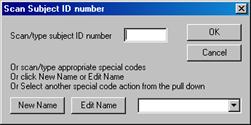
Proceed as for simple portrait images except that after each image has loaded, a Scan Subject ID Number dialog will appear in the top right of the screen (it is deliberately placed here to avoid obscuring the main image).
Scan the barcode on the slip (you can type the number in if necessary). The dialog will disappear. If there is to be no SIMS association for this subject then scan the No Association special barcode instead (or just hit the return key). This can be used for example if taking an image of a pair of siblings as well as their individual images or if you are taking more than one image of each subject. If you have a subject that has no names slip (was not provided with one; for example a new pupil) then scan the Add Name special barcode and enter new details as provided to you.
Instead of scanning the special barcodes (for example if you have not got them with you!) you can click the New Name button to add a new name, the Edit Name button to correct an incorrect name or any of the other actions from the pull down list (these include the start row actions). A no association can be achieved by simply clicking OK (or hitting return) with nothing scanned in.