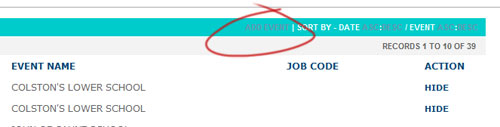
Before running an event it must first be booked with Parker Franklin at their web site: www.ordermyphotos.co.uk/loggedin.asp. Note: you will first need to have an online account with Parker Franklin, if you do not have one yet then simply give us a ring on 0845 094 9183 and we can quickly set one up.
Login to your account and click on ADD EVENT:
You will then go to the Add Event page:
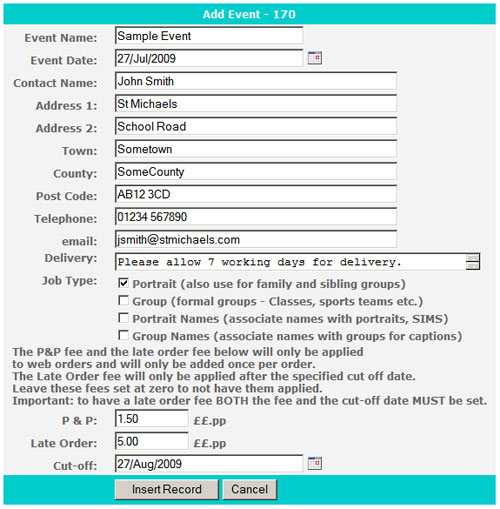
Enter all the details for your new event. Note that this information is sent to Parker Franklin and is the information we will store for that event so, for example, if we are to dispatch the final prints directly to the event host (eg school) then please we sure to enter the correct address. This data is not used by us for any other purposes.
Dates can only be entered by using the icon to the right of the date fields.
The Delivery field is not currently being used.
For job types please see Event Job Types.
If you enter an amount into the P & P field it will be added once onto each order (irregardless of how much has been ordered). This field is optional - leave at 0.00 for nothing to appear to your customers.
If you enter an amount into the Late Order field it will be added once onto each order if that order is placed after the Cut-off date (which must also be entered). This field is optional - leave at 0.00 for nothing to appear to your customers.
After you click Insert Record to create the new event, you will be returned to the initial log in page. You may need to click Last (in the bottom right) to see your new event in the listing. The event job code to use in ProofStation for your new event is shown to the right of the event title:
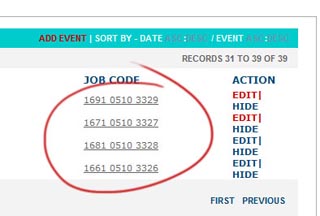
IMPORTANT: If you are going to have multiple photographers at an event it is absolutely vital that each photographer has their own unique code. To obtain the extra codes for your event click the code for your event and you will be taken to the extra event code page:

You must use sequential codes for all the photographers.
These event job codes uniquely identify you the client, the event, photogrpaher and the job type. It is the code required each time you run the ProofStation software and so a careful note of it should be made. It should be used whenever communicating with Parker Franklin on any matter to do with a specific event.
IMPORTANT |